
Hướng dẫn cấu hình kỹ thuật VPN trên Firewall Fortigate (Phần I)
1. Cấu hình công nghệ IPsec VPN trên Firewall Fortigate.
1.1. Cấu hình công nghệ IPsec VPN giữa Firewall Fortigate và Firewall ASA.

Các bước cấu hình IPsec VPN:
Bước 1. Cấu hình trên Switch ISP.
Bước 2. Cấu hình cơ bản và IPsec VPN trên ASA 5506X.
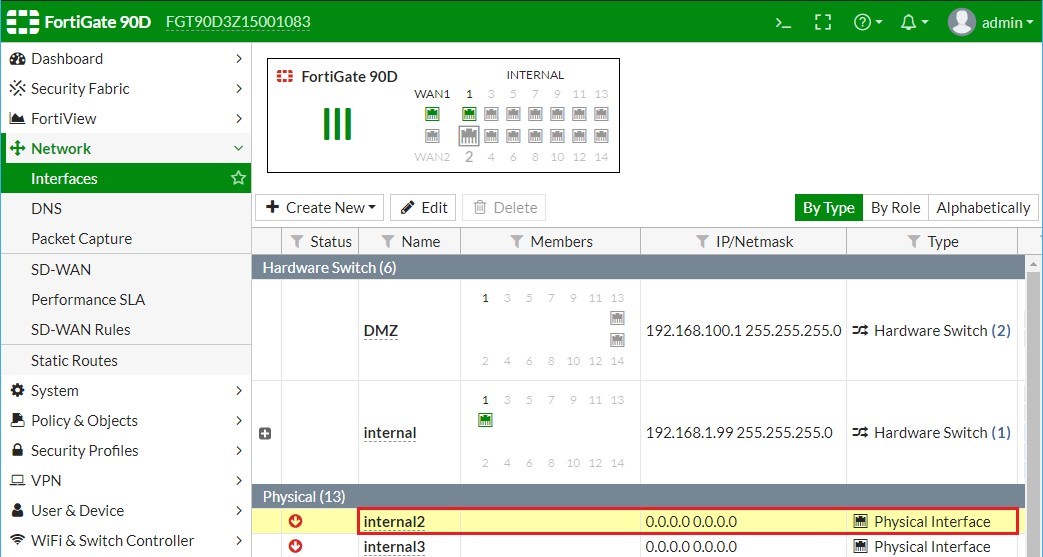
Bước 3. Đặt IP cho các cổng giao tiếp trên Firewall Fortigate.
Bước 4. Cấu hình Default Route trên Firewall Fortigate.
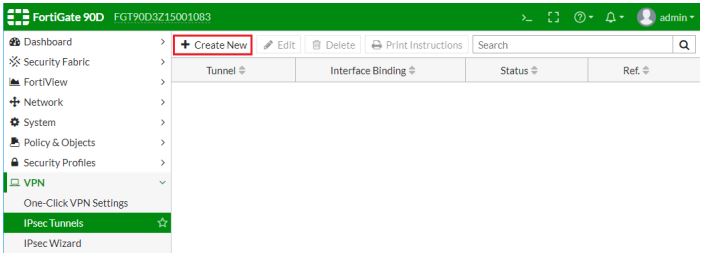
Bước 5. Cấu hình IPsec VPN trên Firewall Firewall Fortigate.
Bước 6. Hiệu chỉnh các tham số cho phiên kết nối IPsec VPN trên Firewall Fortigate.
Bước 6.1. Hiệu chỉnh các tham số IKE Policy (Phase 1).
Bước 6.2. Hiệu chỉnh các tham số IPsec Policy (Phase 2).
Bước 7. Kiểm tra trạng thái IPsec VPN trên Firewall ASA5506X.
Bước 1. Cấu hình trên Switch ISP.
Nếu ta không có đường kết nối Internet thì có thể sử dụng một Switch Layer 3 giả lập môi trường Internet bằng các đặt IP trên Switch như thể hiện trong sơ đồ. Nhiệm vụ của Switch ISP giả lập môi trường Internet là đảm bảo tất cả các IP Public đều có thể giao tiếp được với nhau.
|
hostname ISP ip routing
default interface range f0/1 , f0/2 interface range f0/1 , f0/2 switchport switchport mode access switchport access vlan 1 spanning-tree portfast no shutdown exit interface vlan 1 ip address 203.0.1.1 255.255.255.0 no shutdown exit
vlan 2 exit default interface range f0/3 , f0/4 interface range f0/3 , f0/4 switchport mode access switchport access vlan 2 spanning-tree portfast no shutdown exit interface vlan 2 ip address 203.0.2.1 255.255.255.0 no shutdown exit
line vty 0 4 privilege level 15 no login exit line console 0 logging synchronous exec-timeout 0 0 exit no ip domain-lookup no cdp run no service timestamps debug no service timestamps log |
Bước 2. Cấu hình cơ bản và IPsec VPN trên ASA 5506-X.
|
clear configure all hostname ASA5506X interface g1/1 nameif Outside security-level 0 ip address 203.0.1.2 255.255.255.0 no shutdown exit route Outside 0.0.0.0 0.0.0.0 203.0.1.1
interface g1/3 nameif Inside security-level 100 ip address 192.168.1.1 255.255.255.0 no shutdown exit interface g1/8 nameif DMZ security-level 50 ip address 172.16.0.1 255.255.255.0 no shutdown exit
dhcpd dns 8.8.8.8 dhcpd address 172.16.0.2-172.16.0.254 DMZ dhcpd enable DMZ dhcpd option 3 ip 172.16.0.1 interface DMZ
interface management 1/1 nameif MGMT security-level 100 ip address 172.31.0.1 255.255.255.0 no shutdown exit
http server enable http 172.31.0.0 255.255.255.0 MGMT http 192.168.1.0 255.255.255.0 Inside http 172.16.0.0 255.255.255.0 DMZ
username mobile24h password cisco privilege 15 aaa authentication http console LOCAL asdm image disk0:asdm-792-152.bin object network Inside.ASA1 subnet 192.168.1.0 255.255.255.0 nat (Inside,Outside) dynamic interface exit
class-map inspection_default match default-inspection-traffic exit policy-map global_policy class inspection_default inspect icmp exit exit no service-policy global_policy global service-policy global_policy global |
|
crypto ikev1 enable Outside
crypto ikev1 policy 1 authentication pre-share encryption aes hash sha group 2 lifetime 86400 exit
clear configure tunnel-group
tunnel-group 203.0.2.2 type ipsec-l2l tunnel-group 203.0.2.2 ipsec-attributes ikev1 pre-shared-key mobile24h exit |
|
object network Inside.ASA subnet 192.168.1.0 255.255.255.0 exit object network DMZ.ASA subnet 172.16.0.0 255.255.255.0 exit object network Inside.FortiGate90D subnet 10.0.2.0 255.255.255.0 exit access-list 102 extended permit ip object Inside.ASA object Inside.FortiGate90D access-list 102 extended permit ip object DMZ.ASA object Inside.FortiGate90D crypto ipsec ikev1 transform-set myset esp-aes esp-sha-hmac crypto map outside_map 1 match address 102 crypto map outside_map 1 set peer 203.0.2.2 crypto map outside_map 1 set ikev1 transform-set myset crypto map outside_map 1 set pfs crypto map outside_map interface Outside
nat (Inside,Outside) 1 source static Inside.ASA Inside.ASA destination static Inside.FortiGate90D Inside.FortiGate90D no- proxy-arp route-lookup nat (Inside,Outside) 1 source static DMZ.ASA DMZ.ASA destination static Inside.FortiGate90D Inside.FortiGate90D no- proxy-arp route-lookup
group-policy GPolicy.ASA internal group-policy GPolicy.ASA attributes vpn-tunnel-protocol ikev1 vpn-idle-timeout none exit tunnel-group 203.0.2.2 general-attributes default-group-policy GPolicy.ASA exit |
|
ASA5506X# ping 203.0.1.1 |
Bước 3. Đặt IP cho các cổng giao tiếp trên Firewall Fortigate.


Bước 4. Cấu hình Default Route trên Firewall Fortigate.
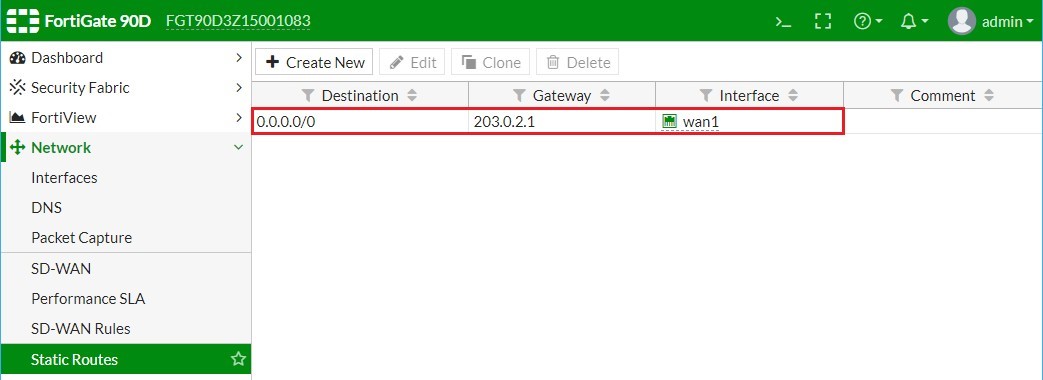
Lúc này thì Firewall ASA và Firewall Firewall Fortigate đã có thể ping được IP Public của nhau.
|
ASA5506X# ping 203.0.2.2 |
Bước 5. Cấu hình IPsec VPN trên Firewall Firewall Fortigate.

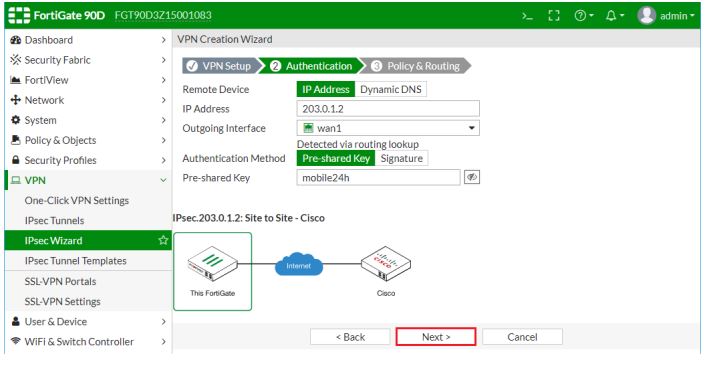
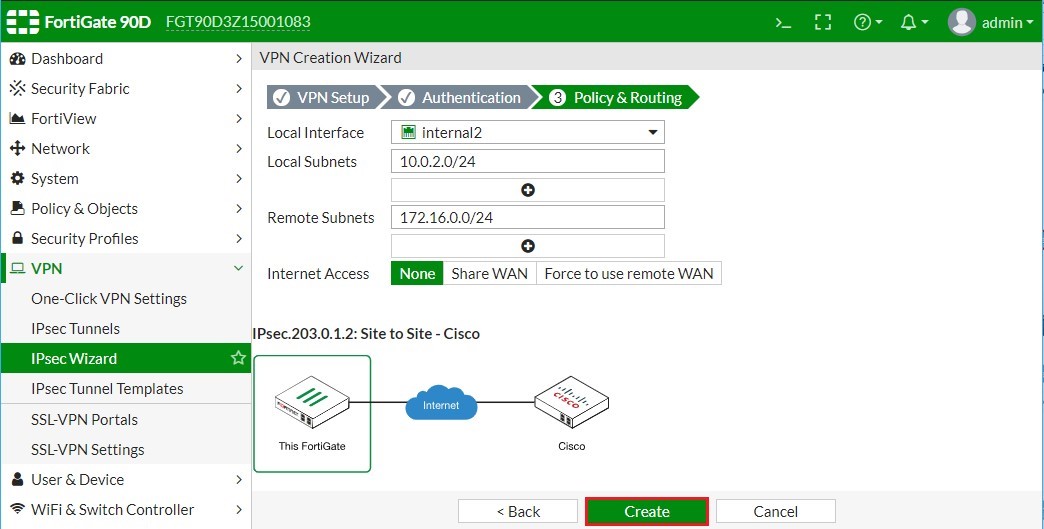
Bước 6. Hiệu chỉnh các tham số cho phiên kết nối IPsec VPN trên Firewall Fortigate.
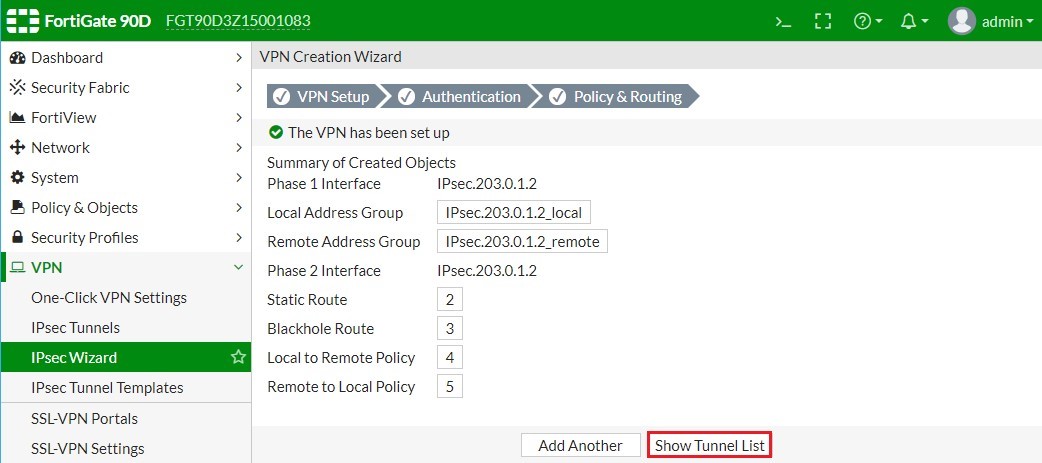
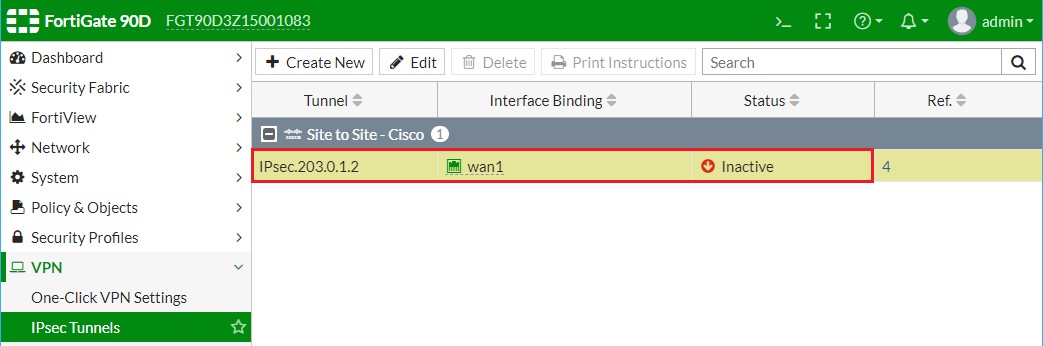

Bước 6.1. Hiệu chỉnh các tham số IKE Policy (Phase 1).
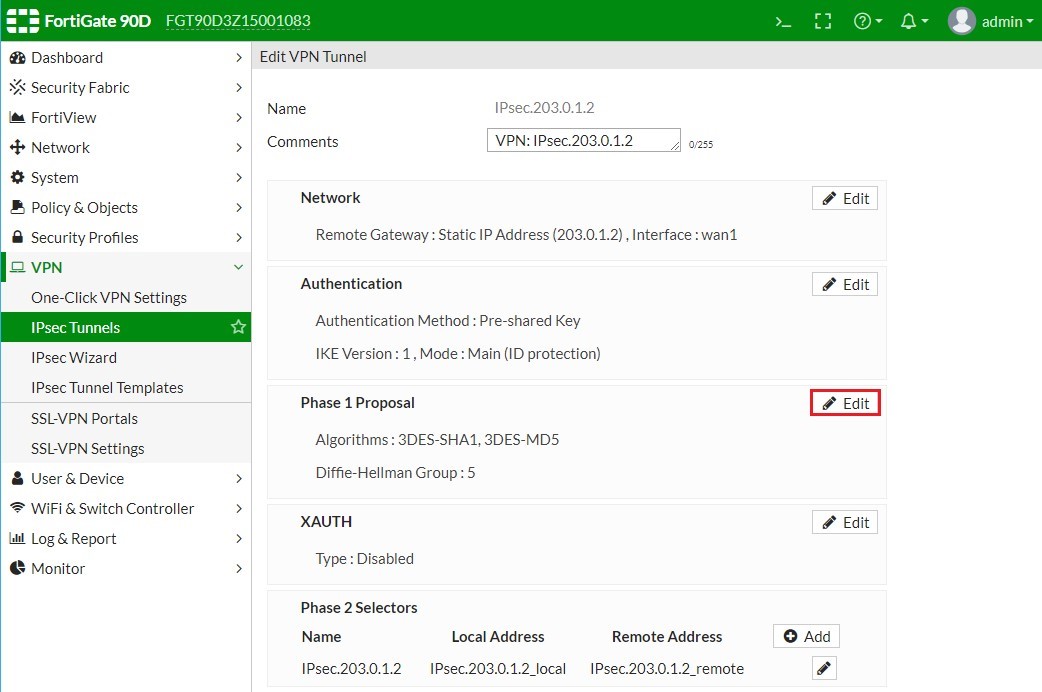

Bước 6.2. Hiệu chỉnh các tham số IPsec Policy (Phase 2).
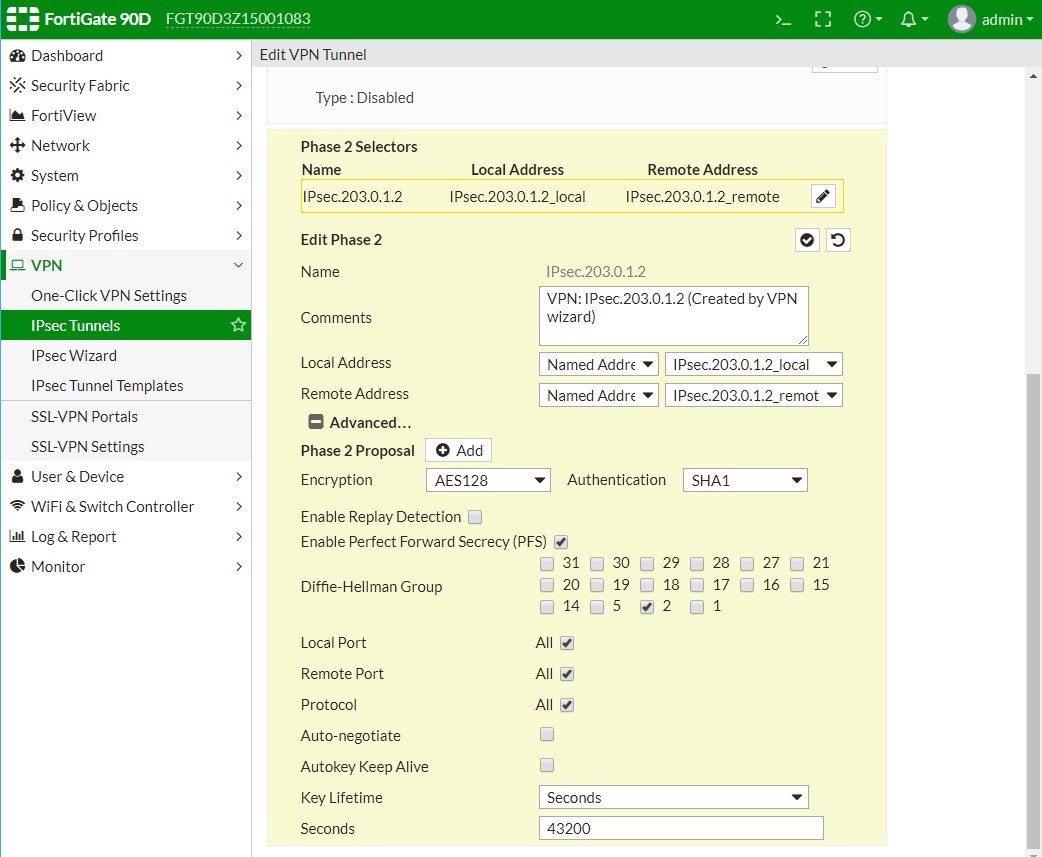
Tại thời điểm này thì kết nối IPsec VPN giữa 2 Firewall đã được thiết lập thành công.
|
PC2# ping 172.16.0.2 |
Bước 7. Kiểm tra trạng thái IPsec VPN trên Firewall ASA5506-X.
| ASA5506X# show crypto ipsec stats
IPsec Global Statistics ----------------------- Active tunnels: 1 Previous tunnels: 1 Inbound Bytes: 180 Decompressed bytes: 180 Packets: 3 Dropped packets: 0 Replay failures: 0 Authentications: 3 Authentication failures: 0 Decryptions: 3 Decryption failures: 0 TFC Packets: 0 Decapsulated fragments needing reassembly: 0 Valid ICMP Errors rcvd: 0 Invalid ICMP Errors rcvd: 0 Outbound Bytes: 0 Uncompressed bytes: 0 Packets: 0 Dropped packets: 0 Authentications: 0 Authentication failures: 0 Encryptions: 0 Encryption failures: 0 TFC Packets: 0 Fragmentation successes: 0 Pre-fragmentation successses: 0 Post-fragmentation successes: 0 Fragmentation failures: 0 Pre-fragmentation failures: 0 Post-fragmentation failures: 0 Fragments created: 0 PMTUs sent: 0 PMTUs rcvd: 0 Protocol failures: 0 Missing SA failures: 0 System capacity failures: 0 Inbound SA delete requests: 0 Outbound SA delete requests: 0 Inbound SA destroy calls: 0 Outbound SA destroy calls: 0
ASA5506X# |
Kết thúc phần I
Các bạn có thể tham khảo thêm các bài viết liên quan sau :
- Hướng cấu hình định tuyến trên Firewall Fortigate (Phần I)
- Hướng dẫn cấu hình định tuyến trên Firewall Fortigate (Phần II)
- Hướng dẫn cấu hình cơ bản trến Fireall Fortigate (Phần I)
-